
Snowy Landscape (Multiple Shaders)

Platform:
PC
Engine:
Unity Engine
Duration:
3 months
Completion:
2023
Team Size:
1
Tools:
Visual Studio, Unity Shader Graph, GitHub
Programming Languages:
C#, C++
My Roles:
Shader Developer, Technical Artist
Project Synopsis
I developed a series of custom shaders for a snow-themed environment. The shaders I created include an Interactive Trail Shader to simulate footprints in the snow, a Customizable Snowflake Shader that allows for the dynamic adjustment of snowflake appearance, an Ice Shader to realistically render frozen surfaces like a frozen lake, and some more.
The project aimed to deepen my understanding of shader development and provided the opportunity to experiment with a variety of shader techniques to create a dynamic and immersive landscape.

Overall Task
The task was to explore a new area or deepen our knowledge in a field we hadn't worked with before. I chose to expand my expertise in Unity’s Shader Graph and shader development, focusing on creating shaders for a snowy landscape.
My Tasks Included:
-
Designed and implemented custom shaders using Unity’s Shader Graph, enhancing visual fidelity and environmental immersion.
-
Developed a Frosted Glass Shader, simulating condensation and frost buildup on surfaces for added depth and realism.
-
Created an Ice Shader, enhancing reflective and translucent properties to make frozen surfaces appear more dynamic and immersive.
-
Developed an Icicle Shader, dynamically generating and adapting icicles based on environmental conditions to ensure natural appearance.
-
Created a Snowflake Shader, procedurally generating intricate snowflake patterns to add fine details to the environment.
-
Developed a Trail Shader, enabling dynamic snow trails that react to player movement, increasing interactivity and immersion.
-
-
Applied advanced techniques like UV manipulation, Render Textures, and Custom Function Nodes, achieving detailed, high-quality visual effects.
-
Refined shaders for seamless integration with Particle Systems and VFX Graph, ensuring compatibility with the game's visual and performance requirements.

-

Frosted Glass Shader
The Frosted Glass Shader is designed to mimic the appearance of frosted or frozen glass surfaces. The process began with designing the base material, where I incorporated techniques from the Ice Shader to simulate light scattering and reflection. By tweaking the refraction and surface roughness, I created the characteristic frosted texture that mimics the uneven light diffusion seen in real frozen glass.
To enhance realism, I integrated Alpha Clipping into the shader. This involved using a mask texture to define areas of the material that should be clipped, creating the effect of scattered imperfections. These clipped sections no longer interact with light, giving the material its distinctive frosted and patchy look. Configuring Alpha Clipping required enabling it in the Shader Graph’s Surface Options and carefully balancing the mask’s texture values to achieve the desired appearance.
I fine-tuned the shader’s parameters to allow for customization, such as adjusting the intensity of the frosting and the density of clipped areas. This approach not only made the shader versatile for different use cases but also ensured that it maintained high performance and visual fidelity.

Showcase of customizing the shader.
Frosted Glass Shader on a window

Showcase of customizing the shader.
Two characters encounter an injured raccoon, triggered by an earlier player decision.
Frosted Glass Shader on a window
Ice Shader
The Ice Shader was developed to realistically simulate the appearance of ice, focusing on its unique interaction with light. The primary goal of this shader was to capture the way light refracts, reflects, and interacts with the surface and subsurface of ice, creating a visually convincing and immersive effect.
A key element in achieving this was the use of the HD Scene Color Node in Shader Graph, which enabled access to the frame buffer before the frame’s rendering was completed. This node was critical for simulating light refraction within the ice, providing the realistic depth and translucency characteristic of frozen materials. However, its behavior varies depending on the render pipeline.
Showcase of the shader's customization.
Ice shader used for a frozen lake.

Showcase of the shader's customization.
Ice shader used for a frozen lake.
Icicle Shader
The Icicle Shader was developed to simulate icicles forming on objects, regardless of their orientation. This shader dynamically adapts the placement of icicles in real-time, ensuring they always point downward and only appear in areas where they would naturally form. This adaptability makes it versatile for use in various environments and assets.
A key part of the shader's construction was creating a Y Mask to define where icicles form based on the world space orientation of the object. Using a Normal Vector Node set to world space, the Y component was extracted with a Split Node and multiplied with negative values to create the mask. This mask determines the areas of the texture where icicles appear, visually represented by a gradient transitioning from white (active areas) to black (inactive areas).
The shader also integrates a Lerp Node, allowing a seamless transition between the object's base texture and an ice texture. This transition is controlled by an Ice Slider Float, giving users the ability to adjust the intensity and coverage of the icicles.
Showcase of the icicle shader.
Icicle shader on a bench.

Icicle shader on a bench.
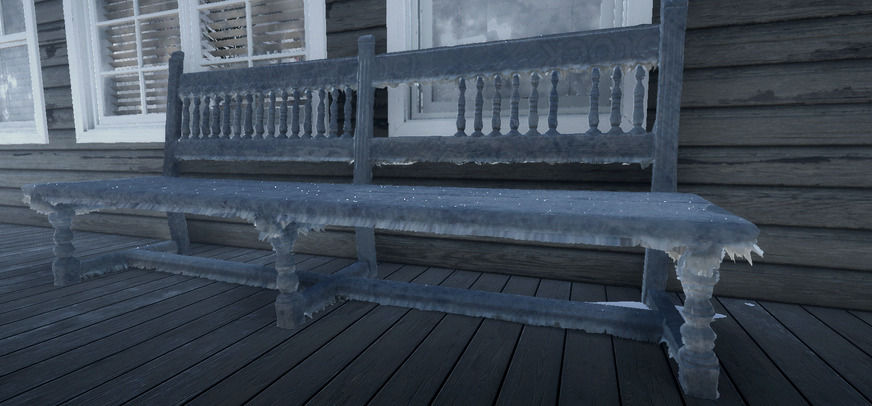
Showcase of the icicle shader.
The tessellation was used to enhance the visual detail of the icicles, ensuring realistic depth and surface interaction. Optional features, such as emissive highlights or sparkling effects, can be added to enhance the visual appeal further.
Snowflake Shader
The Snowflake Shader is a fully procedural shader I developed using Unity's Shader Graph to generate snowflakes without relying on textures. The foundation of the snowflake starts with a single node, which serves as the base shape. Through iterative node combinations and mathematical operations, the simple base evolves into intricate and detailed designs. This method leverages Shader Graph’s power to create efficient and customizable effects while maintaining a lightweight setup suitable for real-time applications.
A major highlight of the shader is its ability to create diverse shapes through user-defined parameters. I implemented controls that allow adjustments to key properties, such as the number of branches, the width of the arms, and other geometric details. These parameters are exposed as sliders or float inputs, making it intuitive for users to experiment and refine the look of their snowflakes. This flexibility was achieved by carefully designing the node tree to allow for dynamic variations while maintaining the mathematical symmetry that defines real snowflakes.
To demonstrate its functionality, I integrated the shader into particle systems and VFX setups. Using the shader with Unity’s Particle System, I was able to simulate a snowfall composed of procedurally generated snowflakes. By customizing the particle behavior - such as fall speed, rotation, and scale - these snowflakes came to life.
Snowflake shader with particle system.
Snowflake shape changing showcase.
Snowflake shader with particle system.
Quick-Time-Event, where the player must press a key multiple times quickly.
Quick-Time-Event, where pressing the correct key at the right moment alters the outcome.
Trail Shader
The Trail Shader was designed to create dynamic snow trails in real-time, adding an interactive and immersive element to snowy environments. By leveraging a Particle System or Unity’s VFX Graph, this shader captures where a player or object has moved through the snow, leaving behind trails that react to the game world.
The shader operates using a combination of Render Textures and an orthographic camera, which monitors the area affected by the shader. The camera must be carefully aligned above the target surface and scaled to match the dimensions of the terrain for accurate trail placement. A dedicated layer ensures the camera focuses exclusively on the spawned particles used to mark movement. These particles form the foundation for the trail’s appearance on the snow surface.
Users can adjust transition intensity, textures, and other parameters to achieve the desired look. A calculation is performed within the shader using a Custom Function Node, which recalculates UVs at impacted areas to create realistic indentations in the snow. These indentations are visualized with height offsets, simulating the effect of weight pressing into the snow.
Tracks in the snow from a human figure - using the trail shader.

Showcase of the trail shader.
Tracks in the snow from a human figure - using the trail shader.
Showcase of the trail shader.


Two characters encounter an injured raccoon, triggered by an earlier player decision.
Two characters encounter an injured raccoon, triggered by an earlier player decision.
The player makes a choice, leading to a cutscene where they decide to pretend nothing happened instead of telling the truth.
Refraction & Masking
This section of the Frosted Glass Shader simulates a frosted glass effect by combining screen-space refraction and texture-based masking. The Screen Position and HD Scene Color nodes gather screen UVs and scene colors, simulating light distortion. A Multiply and Add operation introduce irregular UV offsets, mimicking frosted surface refractions.
Two characters encounter an injured raccoon, triggered by an earlier player decision.
The player makes a choice, leading to a cutscene where they decide to pretend nothing happened instead of telling the truth.
Water Under Ice
This section of the Shader Graph is responsible for simulating the water beneath the ice surface in the Ice Shader. It combines Gradient Noise and Voronoi patterns to create an organic texture that represents the water.
Two characters encounter an injured raccoon, triggered by an earlier player decision.
The player makes a choice, leading to a cutscene where they decide to pretend nothing happened instead of telling the truth.
Frosted Appearance
This section of the Shader Graph is designed to create the frost effect for the Icicle Shader, focusing on achieving a realistic, visually appealing frosted appearance. It integrates several elements, including texturing, dynamic tinting, and edge highlighting, to enhance the overall aesthetic of the shader.
Two characters encounter an injured raccoon, triggered by an earlier player decision.
The player makes a choice, leading to a cutscene where they decide to pretend nothing happened instead of telling the truth.
Symmetrical Mask Pattern
This part of the Snowflake Shader focuses on creating a detailed, procedural snowflake mask. It combines various mathematical operations to generate a symmetrical and visually intricate snowflake pattern, which is then refined for further use in the shader.
Two characters encounter an injured raccoon, triggered by an earlier player decision.
The player makes a choice, leading to a cutscene where they decide to pretend nothing happened instead of telling the truth.
Trail Texture
This section of the Shader Graph is designed to manage the blending and visibility of the trail effect for the Trail Shader. It uses the sampled trail render texture and applies modifications to its RGBA channels to create a mask and blend effect. By isolating and combining the alpha and color data, it ensures that the trail integrates smoothly with the main texture while maintaining sharp edges and preventing visual artifacts. Additionally, the Clamp node limits the output values, ensuring the trail effect remains within the desired visual range, avoiding overexposed or unintended transparency.
Two characters encounter an injured raccoon, triggered by an earlier player decision.