
Through The Line: Imaginary Friend

Platform:
PC
Engine:
Unity Engine
Duration:
1 month
Completion:
2024
Team Size:
1 (+4 Freelancer)
Tools:
Visual Studio, GitHub
Programming Languages:
C#
My Roles:
Lead Developer, Narrative Designer, Game Designer, Casting Director, Voice Director, QA Manager, Technical Lead - Build
Project Synopsis
In Through The Line: Imaginary Friend, players step into the shoes of Logan Sommerset, a seasoned paranormal investigator, as he receives a distressing call from Clare, a babysitter who has been caring for seven-year-old Oliver for months. Over the past few weeks, Clare has experienced a series of unexplained events in Oliver's home: objects shifting on their own or fleeting shadows at the corner of her vision.
Logan, armed with his laptop and a specialized paranormal identification program, must navigate this growing mystery remotely. With Clare on the line, the player must sift through strange occurrences, asking the right questions and cross-referencing the details with the database to uncover the entity’s identity. The haunting intensifies with every passing moment. Clare's safety depends on Logan’s ability to piece together the spirit’s backstory and figure out its intentions.

Overall Task
This game was created for the Game Off 2024 game jam. The theme was Secrets. Every participant had one month to build a game, using any programming languages, game engines, or tools they preferred.
My Tasks Included:
-
Created the story and defined key plot points, establishing a compelling narrative that drives the player's journey and shapes their experience throughout the game.
-
Created branching dialogues and cutscenes, allowing players to make impactful choices and interact with the story in a way that enhances replayability and immersion.
-
Cast voice actors and provided detailed direction, ensuring high-quality performances that brought characters and the storyline to life, enriching the overall narrative experience.
-
Created a mission system, structuring both main and side quests to guide the player while offering opportunities for exploration and deeper engagement.
-
Developed first-person controls, enabling intuitive and seamless gameplay mechanics that allow the player to interact naturally with the game world.
-
Created tutorials, introducing players to the core game mechanics and providing guidance, ensuring a smooth learning curve without overwhelming the player.
-
Developed an interaction system, allowing players to engage with in-game objects and characters, enriching the gameplay and enhancing immersion.
-
Created an in-game laptop with various softwares, including:
-
A note/editor tool to track important information, enhancing the gameplay experience with additional organizational depth.
-
A ghost-identification software for analyzing and identifying entities, adding a layer of mystery and puzzle-solving mechanics to the game.
-
Integrated audio, UI elements, and other components, bringing together all game elements to create a cohesive and immersive experience that enhances the player’s enjoyment.
-

-
Created tutorials to guide players through the game mechanics, ensuring a smooth onboarding experience and helping them understand key gameplay systems.
-
Managed voice actor casting and directed performances, ensuring high-quality voice work that brought characters to life and matched the game’s tone.
-
Fully localized the game in both German and English, making it accessible to a broader audience and increasing the game’s potential market.
-
Led testing efforts to maintain high-quality standards, tracking and fixing bugs to ensure a smooth, polished final product.
-
Managed build processes and version control, ensuring project stability and smooth collaboration within the team.
Integrated UI with animations, ensuring a smooth, intuitive user experience and improving overall gameplay fluidity. -
Integrated audio, animations, and VFX, creating a cohesive and immersive gameplay experience that enhanced both atmosphere and player engagement.

-

Dialogues
In this game, dialogues represent one of the core mechanics alongside interactions with the laptop. Since the main character constantly communicates with the secondary character, who is on the other end of the phone, it was crucial to design the dialogue system to be both efficient and flexible. This ensures a seamless experience, as dialogues are used frequently to drive the story forward.
The Unity Timeline played a central role in implementing the dialogue system. Unity's Timeline is a feature that allows developers to choreograph animations, audio, and other events in a visual timeline editor. For the subtitles, I created a custom track, enabling precise control over when and where specific text appears on screen. By defining the text element in advance, I can ensure that the subtitles are displayed at the exact moments needed and for the appropriate duration.
Additionally, I integrated Timeline Signals into the system. Signals in Unity are powerful tools used to trigger specific events at predefined points within a timeline. In this project, signals were utilized to manage various gameplay elements. For instance, they were used to start or end missions, progress the storyline when the player asked a certain number of questions, or trigger specific events based on the player’s actions. They also enabled conditional dialogues, ensuring that certain dialogue lines would only play if the player had made a specific decision, completed a prior event, or triggered a related dialogue earlier in the game.
For the foundational structure of the dialogues, I worked with Scriptable Objects.

Showcase of how dialogues can be triggered via laptop.
Phone UI displaying questions the player can ask the character on the other end to gather more information.
Showcase of how dialogues can be triggered via laptop.
Two characters encounter an injured raccoon, triggered by an earlier player decision.
Phone UI displaying questions the player can ask the character on the other end to gather more information.
Each dialogue has its own dedicated Scriptable Object, containing all relevant data: the associated Timeline, whether the dialogue has been played, missions that need to be triggered, and any parameters needed by the Timeline Signals. This modular approach allows each dialogue to function independently, avoiding the complexity of managing a large, centralized script. Instead of searching through a monolithic script to find and manage specific signals or actions, each dialogue's information is neatly packaged in its own Scriptable Object. This not only keeps the system clean and organized but also simplifies debugging and future expansions. It ensures that the dialogue system is robust, scalable, and easy to manage.
Interacting
The interaction system in the game is designed to allow the player to interact with various objects based on what is positioned at the center of the screen, where a crosshair is located. This is achieved using a Raycast, which detects if any interactive objects are within the player’s line of sight. When an object can be interacted with, its name appears in the UI, and the player is given an interaction prompt.
To manage interactivity, each object that can be interacted with implements a common interface. This interface defines a standard set of behaviors that every interactive object must have. For example, it ensures that all objects provide a way to display an interaction prompt when viewed and a method for executing the specific behavior that occurs when the player interacts with the object.
Each object, such as Logan's laptop, contains unique logic for what happens when it’s interacted with - whether that’s displaying a UI, triggering an animation, or activating some other event. These objects are able to respond differently to the same interaction trigger, depending on their individual design.
When the player looks at an object and presses the interaction button, the system uses the Raycast to detect the object in focus. If the object is interactable, the UI will display the prompt and, upon activation, the specific behavior of the object will occur.
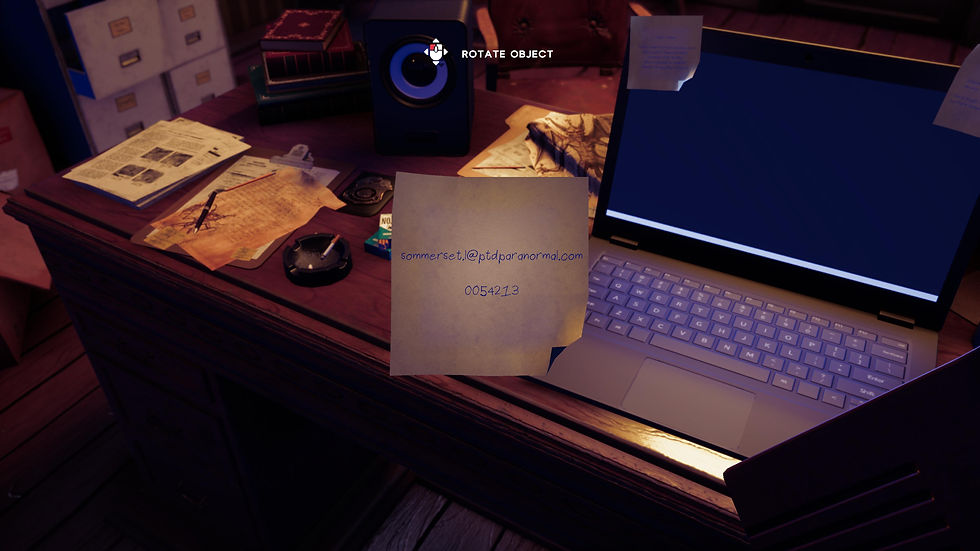
Rotating a multimeter to inspect it closely.
Rotating an EMF device to get a better view.
Rotating a multimeter to inspect it closely.
Rotating an EMF device to get a better view.
For example, this could involve opening the laptop’s interface or starting a cutscene related to that object.
By using an interface to define the core interaction functionality, this system allows for easy expansion. New interactive objects can be added simply by ensuring they follow the same interface structure, without the need to modify the underlying interaction system. This keeps the system flexible and scalable as the game grows.
Laptop
Logan's laptop plays a key role in the game, acting as a central tool for the player to interact with different in-game systems. The laptop houses several software programs, including a note editor and a specialized program designed to identify and track entities (spirits). Throughout the game, players are encouraged to frequently use the laptop to progress through the storyline, solving puzzles and uncovering important information.
The design and behavior of the software interfaces are inspired by real-world applications, creating a sense of immersion. The software windows can be freely moved around the screen, and the most recently clicked window appears on top of others. Actions like opening windows through double-clicks and navigating through menus mirror real-life interactions, helping to ground the gameplay in a believable, functional environment.
On the technical side, I used Unity’s UI system to implement these behaviors, creating custom scripts to handle window interactions such as dragging, resizing, and stacking. I also integrated functionality that tracks and displays the most recently opened window, ensuring a smooth, intuitive experience for the player.
Laptop UI displaying software icons and .exe files.

Overview of the laptop’s functionalities, including access to various software and tools.
Laptop UI displaying software icons and .exe files.
Overview of the laptop’s functionalities, including access to various software and tools.
For the entity identification software, I developed a system that allows the player to interact with various paranormal data points and clues, triggering specific events based on their progress in the story.
Missions
The missions of this game were designed to be integrated into the narrative without traditional UI elements or mission markers. Instead, objectives are communicated to the player primarily through dialogue and environmental cues. The central mission revolves around helping Clare, a key character, by asking her questions to uncover which entity or spirit is involved, ultimately aiding her in the process.
Optional tasks, such as examining specific photographs, provide additional layers of exploration and context to the story. However, these tasks are not mandatory and do not hinder the progression of the game. Most of the game’s missions are time-based; a timer runs in the background and continues the story once it expires, even if the player has not completed all tasks. The completion or omission of these optional objectives can influence certain aspects of the narrative but doesn't stop the story from advancing.
This approach ensures the player stays engaged with the main storyline, while still having the freedom to explore additional elements at their own pace.
To facilitate the mission system, I utilized Scriptable Objects within Unity. These allowed me to create flexible and reusable mission data assets.
Dialogue hinting at the next objective to move the story forward.
Resolution of the previous dialogue, showing the action needed to progress the story.
Those could store information about mission status, triggers, and completion conditions. The missions themselves are triggered or completed through events such as cutscenes or the completion of other in-game objectives. This approach streamlined the management of mission flow and gave me greater control over the game's narrative progression.
Quick-Time-Event, where pressing the correct key at the right moment alters the outcome.
Quick-Time-Event, where the player must press a key multiple times quickly.
Dialogue hinting at the next objective to move the story forward.
Resolution of the previous dialogue, showing the action needed to progress the story.
Quick-Time-Event, where the player must press a key multiple times quickly.
Quick-Time-Event, where pressing the correct key at the right moment alters the outcome.

Two characters encounter an injured raccoon, triggered by an earlier player decision.
Two characters encounter an injured raccoon, triggered by an earlier player decision.
The player makes a choice, leading to a cutscene where they decide to pretend nothing happened instead of telling the truth.
Interactable Object Detection
void Update()
{
// Casts a ray from the object's position in the direction itis facing
Ray ray = new Ray(this.gameObject.transform.position,this.gameObject.transform.forward);
// Checks if the ray hits a collider in the scene.
if (Physics.Raycast(ray, out RaycastHit hitInfo))
{
// Checks if the hit object implements the IInteractableinterface
if (hitInfo.collider.gameObject.TryGetComponent(outIInteractable interactableObj))
{
// Changes the crosshair color to red, indicating aninteractable object is in focus
UIManager.Instance.crosshair.color = Color.red;
// Displays the name of the interactable object
UIManager.Instance.interactableNameTxt.text =interactableObj.InteractableName();
// Show the interaction tutorial UI if it is set to bedisplayed
UIManager.Instance.interactingTutUI.SetActive(UIManager.Instance.displayInteractingTut);
// Checks if the player clicks the left mouse button tointeract
if (Input.GetMouseButtonDown(0))
{
// Disables the interaction tutorial UI permanentlyafter the first interaction
UIManager.Instance.displayInteractingTut = false;
// Resets any currently set playable asset in theinteraction UI
UIManager.Instance.interactablePD.playableAsset= null;
// Triggers the interaction logic defined in theinteractable object
interactableObj.Interact();
}
}
else
{
// Resets the crosshair color to white
UIManager.Instance.crosshair.color = Color.white;
// Clears the interactable object name from the UI
UIManager.Instance.interactableNameTxt.text = "";
// Hides the interaction tutorial UI since there is nointeractable object in focus
UIManager.Instance.interactingTutUI.SetActive(false);
}
}
}The code defines the behavior for detecting and interacting with objects in the game world. It casts a ray from the player's position in the direction they are facing and checks if the ray hits an object that is interactable, i.e., implements the IInteractable interface. If the object is interactable, the system highlights it by changing the crosshair color to red and showing the object’s name in the UI. Additionally, if the player clicks the mouse, the interaction with that object is triggered.
The system also handles displaying the tutorial UI the first time the player interacts with an object, ensuring smooth onboarding. If no interactable object is detected, the crosshair and UI elements are reset to their default state. This setup allows for easy expansion by simply having objects implement the IInteractable interface, ensuring modular and consistent interaction behavior across the game.
Two characters encounter an injured raccoon, triggered by an earlier player decision.